Secure VPN-Safer Internet
Secure Signal Inc.Tools
4.763.49K Reviews
- Version
- 4.4.5
- Installs
- 100.00M
- Age Rating
- Everyone
Screenshots
Our Review of Secure VPN-Safer Internet
 Analysis by Appyee
I tend to think about a VPN in terms of a simple everyday task: I want to use the internet on my phone without sending traffic directly over whatever connection I happen to be using. That matters most when I’m away from home, switching between Wi-Fi and mobile data, or handling something personal in a shared space. Secure VPN-Safer Internet is a free tools app from Secure Signal Inc. that puts that task within reach without asking me to learn much about networking first.
Its ease of use is the clearest reason I’d suggest it to someone trying a VPN for the first time. The trade-off is that a simple connection button can make a complicated privacy decision feel settled when it isn’t. I see it as one layer of protection and a convenient way to route a connection, not a guarantee that every online activity is anonymous or every website will work as expected.
Start with the connection you actually have
Before switching a VPN on, I’d first ask what I’m trying to do. Reading public news on a familiar home network is different from signing in to an account while waiting at an airport. A VPN is most useful when I want an added layer between my device’s internet traffic and the local network I’m using; it doesn’t make a weak password stronger, prevent me from being tricked by a fake sign-in page, or replace sensible account security.
That distinction helps set realistic expectations for Secure VPN-Safer Internet. It is designed to mask an IP address and encrypt internet traffic, which can be useful when I’m using a connection I don’t control. But a VPN moves trust rather than eliminating it: I’m relying on the VPN provider to handle the connection responsibly, and I still need to judge the websites and services I use.
The Basics of Secure VPN-Safer Internet
Firstly, let's talk about what exactly Secure VPN-Safer Internet does. At its core, this app is designed to mask your IP address and encrypt your internet traffic, which means no more prying eyes snooping on your online activities. Whether you're streaming your favorite shows or checking your bank account, this VPN aims to keep things private and secure.
Setting It Up
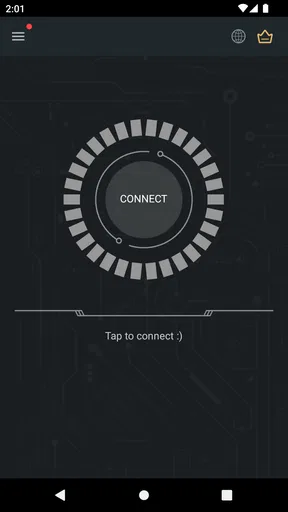
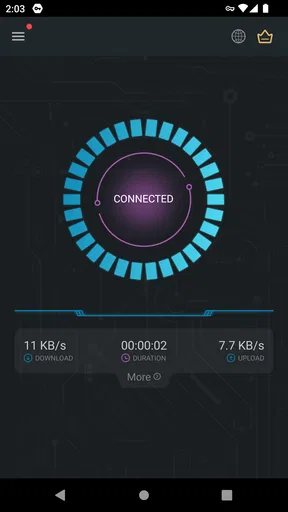
Getting started with Secure VPN-Safer Internet is a breeze. Once you download and install the app, you're greeted with a clean and intuitive interface. Just a few taps, and you're connected. I appreciate how user-friendly it is, especially for those who might not be tech-savvy. You don’t need a degree in computer science to navigate this app!
A practical phone workflow, from tap to task
My sensible routine is to decide on the task first, connect before opening the app or account I care about, and then check that the VPN connection is active before continuing. That order avoids the awkward middle ground where I’ve already loaded a page on the ordinary network and only then remembered to turn protection on. When I’m finished, I can disconnect if I want to return to my usual route; the important point is to make the choice deliberately rather than assume the VPN is always doing something useful.
For example, imagine I’m at a café, waiting for a friend and using my phone to check a travel booking. I’d connect first, open the booking service, confirm the details, and avoid treating the VPN as permission to ignore the site’s own security checks. If the page takes longer or a payment screen behaves oddly, I’d pause rather than repeatedly submit the form. A VPN can change how a service sees the connection, and some services may challenge or reject traffic that appears to come from a different location.
That is also why I would not leave a VPN on reflexively for every activity. A secure tunnel can be helpful, but it may add friction to location-sensitive services, local devices, or apps that expect a familiar network. If a banking app asks for an extra verification step after I connect, that isn’t automatically evidence of a problem; it can be a normal response to a changed connection. I’d complete verification through the bank’s own app or site, not through a link in an unexpected message.
Performance and Speed
Now, onto the performance. One of my biggest concerns with VPNs is that they can slow down your internet speed. However, while using Secure VPN-Safer Internet, I found that my connection remained pretty stable. Streaming HD videos and playing online games worked smoothly, although, like with any VPN, there might be a slight dip in speed depending on the server location.
When a quick connection needs a little troubleshooting
If a page stalls after connecting, I’d test the same task again without the VPN before blaming the app or the website. If it works normally without the tunnel, the connection route may be the source of the friction. For a simple browsing task, choosing a nearby server is often a more practical first try than selecting a faraway country just because it sounds faster. A longer route can add delay, and the best choice depends on what I’m doing rather than on a server label alone.
For video calls, online games, or anything sensitive to delay, I’d prioritize a steady connection over changing locations repeatedly. If performance becomes inconsistent, I’d pause downloads or close other bandwidth-heavy activity before making several VPN changes at once; changing one thing at a time makes it easier to tell what helped. And if a game or call becomes less usable with the VPN, disconnecting for that particular task can be a reasonable choice when privacy needs are low and the network is trusted.
Privacy and Security Features
Of course, the main reason you'd use a VPN is for privacy, right? Secure VPN-Safer Internet doesn't skimp on this front. It uses top-notch encryption protocols to keep your data secure. Plus, it offers a no-log policy, meaning they don't store your browsing history. This is crucial for folks who are serious about keeping their digital footprint minimal.
What the privacy layer can—and cannot—do
I’d treat the VPN as a useful part of a privacy routine, not the whole routine. It can help protect traffic as it travels through a network, but it does not stop tracking that happens through an account I’m signed into, cookies, or information I choose to submit. If I log in to a service, that service can still associate activity with my account. For less tracking, I’d also review app permissions and account settings, use unique passwords, and avoid entering personal details on pages I don’t trust.
The app’s no-log policy is an appealing part of its privacy pitch, but privacy-minded users should still make their own comfort level the deciding factor. I wouldn’t use any VPN as a substitute for understanding who operates it and what trust I’m placing in that provider. Someone whose work depends on strict, independently verifiable privacy assurances may prefer to compare services in depth before choosing, rather than relying on a quick, beginner-friendly setup alone.
Global Server Access
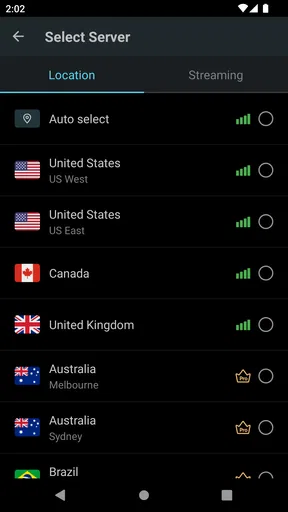
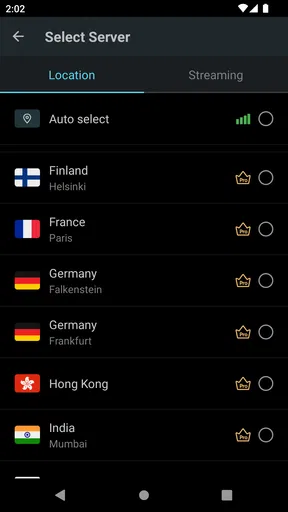
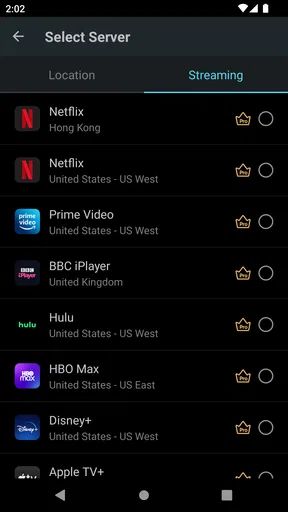
The app boasts a vast array of servers across multiple countries. This is great if you're trying to bypass geo-restrictions. Want to watch that Netflix show only available in another region? Secure VPN-Safer Internet has got you covered. Just choose a server from the list, and you’re good to go.
Choosing a location without creating new problems
Changing a server location can be useful for testing whether a website or service is available through a different route, but I wouldn’t assume every streaming catalog will become accessible just because I connect elsewhere. Streaming platforms can detect or restrict VPN traffic, and their regional access rules still apply. If a show is unavailable, repeatedly hopping between locations can waste time and may trigger account checks. For watching something on a service I already use, I’d first try the normal connection and use a VPN location only when there’s a clear reason.
Location changes also affect ordinary tasks. A weather app, map, or local search may interpret the VPN’s apparent location differently from the phone’s actual location. If recommendations suddenly look irrelevant, I’d check whether the VPN is the cause before changing the app’s location settings. This is a practical trade-off: a different apparent IP can be useful for privacy or access testing, but it can make location-aware services less convenient.
Cost and Pricing
While the app offers a free version, which is nice for testing the waters, you'll likely want to upgrade to the premium version for full access to all features and better speed. The pricing is competitive, and there are usually deals to be found if you’re willing to commit to a longer subscription.
Deciding whether the free option is enough
The app is free to install, while optional in-app purchases range from $1.99 to $59.99 per item. I’d start by trying the free experience for the specific job I have in mind instead of upgrading on the assumption that paid automatically means better privacy or faster service. If I’m considering a purchase, I’d check the current plan details in the app, what access it adds, and how billing renews before confirming. A VPN subscription is only good value if I use it often enough and the features match my needs.
This is one area where comparison matters. Some people will be better served by a VPN included with a security suite they already pay for; others may prefer a provider whose plans and privacy documentation they have researched carefully. Secure VPN-Safer Internet makes more sense to me as an approachable starting point than as an automatic choice for someone who needs detailed controls or has strict workplace requirements. I wouldn’t pay just to solve a temporary problem that a trusted home network or mobile connection already handles well.
Who benefits most, and who may want another tool
I think the app is most suitable for someone who wants a straightforward way to use a VPN on a phone, especially a newcomer who values a short setup path over a screen full of network options. It can fit routine browsing while travelling, checking personal accounts on a network I don’t manage, or trying a different connection route when a site behaves differently by location. It also has a broad audience: it is rated for Everyone, has a 4.7 average from around 2.3 million ratings, and has passed over 100 million installs.
On the other hand, I’d suggest a different approach for people who need granular network controls, a clearly documented configuration for company devices, or a service chosen through a detailed privacy audit. A VPN can also be the wrong tool when the priority is lowest possible latency, as in competitive online play, or when an app depends heavily on local-network discovery. In those cases, I’d weigh the privacy benefit against the immediate task instead of keeping the tunnel on by habit.
Secure VPN-Safer Internet was released on March 16, 2018, and its current version is 4.3.11, with Android 6.0 as the minimum operating system. Those details make it worth checking compatibility on an older phone before relying on it while travelling. If the app is not supported on a device, I’d avoid waiting until I’m away from home to discover that; sorting out a backup connection plan beforehand is an easy bit of preparation.
Customer Support
In my experience, the customer support for Secure VPN-Safer Internet has been responsive and helpful. Whether you're facing technical issues or have questions about your subscription, their support team is just a message away. It's reassuring to know that help is readily available if needed.
What I’d check before relying on it away from home
Before a trip, I’d install the app and test a normal connection while I still have access to a network I trust. I’d also make sure I can sign in to the accounts I may need and understand how to reach support from within the app if something goes wrong. That small rehearsal is more useful than discovering during a rushed airport connection that an account needs a password reset or a service dislikes the VPN route.
If the connection fails at an inconvenient moment, I’d separate the problem into steps: check whether the phone itself has internet access, try reconnecting, then see whether the issue affects one app or everything. That prevents needless account changes when the real issue is simply a weak public network. For subscriptions or billing questions, I’d use the app’s support route and keep the purchase information available, rather than sharing account or payment details in an unsolicited message.
Final Thoughts
So, is Secure VPN-Safer Internet worth downloading? If you're in need of a reliable VPN service that offers solid performance without breaking the bank, then absolutely. It's perfect for both VPN novices and seasoned users who want to keep their online activities private. Just remember, while no VPN is perfect, this one comes pretty close.
In a world where online privacy is becoming more of a luxury than a right, having a tool like Secure VPN-Safer Internet in your digital arsenal can make all the difference. Give it a try, and surf the web with peace of mind!
My recommendation is to treat it as a convenient first step, then judge it by how it works for your own routine: connect before a task where the network is unfamiliar, see whether the apps you rely on still behave properly, and decide whether the free use meets your needs before paying. That approach keeps expectations sensible and makes the choice personal rather than based on a promise of perfect privacy.
Privacy and Permissions
See what permissions an app requests and how it handles your data.
- Wi-Fi connection information
- view Wi-Fi connections
- Other
- view network connections, full network access, prevent device from sleeping
Verdict
Strengths of Secure VPN-Safer Internet
- Fast and stable connection speeds.
- User-friendly interface for easy navigation.
- Supports multiple device connections.
- Wide range of server locations.
- No-log policy ensures privacy.
Limitations of Secure VPN-Safer Internet
- Limited features in free version.
- Occasional connection drops.
- Ads can be intrusive at times.
- No dedicated IP option available.
- Customer support response is slow.
Other Releases by Secure Signal Inc.
View All
Thunder VPN - Fast, Safe VPN
Tools4.8
Similar Picks in This Category
View All
Google LLC4.0

Gboard - the Google Keyboard
Google LLC4.5

Google Play services
Google LLC4.3

Google Play Store
Google LLC4.9

Files by Google
Google LLC4.5

SHAREit: Transfer, Share Files
Smart Media4U Technology Pte.Ltd.4.3
Frequently Asked Questions
What is Secure VPN-Safer Internet and how does it work?
Secure VPN-Safer Internet is a mobile application designed to protect your online privacy by encrypting your internet connection. It works by routing your internet traffic through secure servers, masking your IP address and shielding your data from potential cyber threats. This ensures a safer browsing experience on both public and private networks.
Is Secure VPN-Safer Internet free to use, or does it require a subscription?
Secure VPN-Safer Internet offers both free and premium versions. The free version provides basic VPN services with limited server options, while the premium subscription unlocks additional features such as faster speeds, more server locations, and enhanced security protocols. Users can choose a monthly or yearly subscription plan based on their needs.
How do I install and set up Secure VPN-Safer Internet on my device?
To install Secure VPN-Safer Internet, visit the Google Play Store or Apple App Store, search for the app, and download it. Once installed, open the app, and follow the on-screen instructions to set up your account. You can then select a server location and connect to the VPN with a single tap, ensuring your internet connection is secure.
What platforms is Secure VPN-Safer Internet compatible with?
Secure VPN-Safer Internet is compatible with both Android and iOS devices. It supports a wide range of smartphones and tablets, ensuring that users on different platforms can enjoy secure internet browsing. Regular updates are provided to maintain compatibility with the latest operating systems and devices.
Are there any data limits or restrictions when using Secure VPN-Safer Internet?
The free version of Secure VPN-Safer Internet may have data limits or bandwidth restrictions, depending on the server load and network conditions. However, the premium version typically offers unlimited data usage, allowing users to browse, stream, and download without worrying about hitting any data caps. It's advisable to review the app’s terms for specific details.
